There are thousands of articles about writing cold emails. Most of them will tell you to use the PAS framework, personalize with the prospect's first name, and keep it under 100 words.
That's fine advice if you're selling a SaaS product to a marketing manager. It's almost useless if you're a services firm trying to start a conversation with a business owner about a $50,000 engagement.
Business owners are different prospects. They get more cold email than almost anyone. They're skeptical by default — because they sell services themselves and know what outreach looks like from the inside. And their purchase decisions are relationship-based, not transactional. A clever subject line isn't going to close a consulting deal.
We've written and tested cold email campaigns for MSPs, staffing agencies, consultancies, and accounting firms. Here's what we've learned about what actually gets business owners to reply — and the data behind it.
The Emails That Get Ignored (And Why)
Before we talk about what works, it helps to understand why most cold emails to business owners fail. We see the same mistakes in almost every DIY campaign that comes to us after flopping.
The "we're amazing" email. This one leads with credentials, awards, years in business — everything about the sender and nothing about the recipient. "We're a top-rated IT services firm with 15 years of experience and over 200 clients..." Nobody cares. The business owner's first thought is: "Why should I read this? What does this have to do with me?"
Data point: Pitching in the initial email reduces reply rates by up to 57%. (Gong, 28M emails analyzed)
The vague pain point email. "Many companies struggle with [broad problem]..." This is the cold email equivalent of a horoscope — vague enough to apply to anyone, specific enough to apply to no one. Business owners scan this and immediately know it was sent to a thousand other people. Delete.
The calendar grab. "Are you available for a 15-minute call this Thursday?" as the entire ask in a first email from a total stranger. No context, no reason to care, no indication that you know anything about their business.
Data point: Interest-based CTAs ("worth exploring?") get a 12% reply rate with 68% positive responses. Meeting requests get 7% with only 41% positive. That's nearly double the performance just by changing what you ask for. (Gong, 304K emails)
The essay. Four paragraphs about your methodology, your process, your differentiators. Business owners are busy. They're reading email between meetings, often on their phone. The data consistently shows first-touch emails perform best in the 50–80 word range. If your email requires scrolling, it's too long.
All of these share the same root problem: they're written from the sender's perspective, not the recipient's. The fix is simple in concept and hard in practice — write every email as if you're starting a conversation, not delivering a pitch.
What Actually Gets Replies: The Three Things That Matter
After running campaigns across dozens of services firms, we've found that reply rates come down to three things. Not subject lines, not send times, not formatting tricks. Three things.
1. A Specific, Relevant Reason for Reaching Out
This is the single biggest difference between emails that get replies and emails that get deleted — and the data backs it up dramatically.
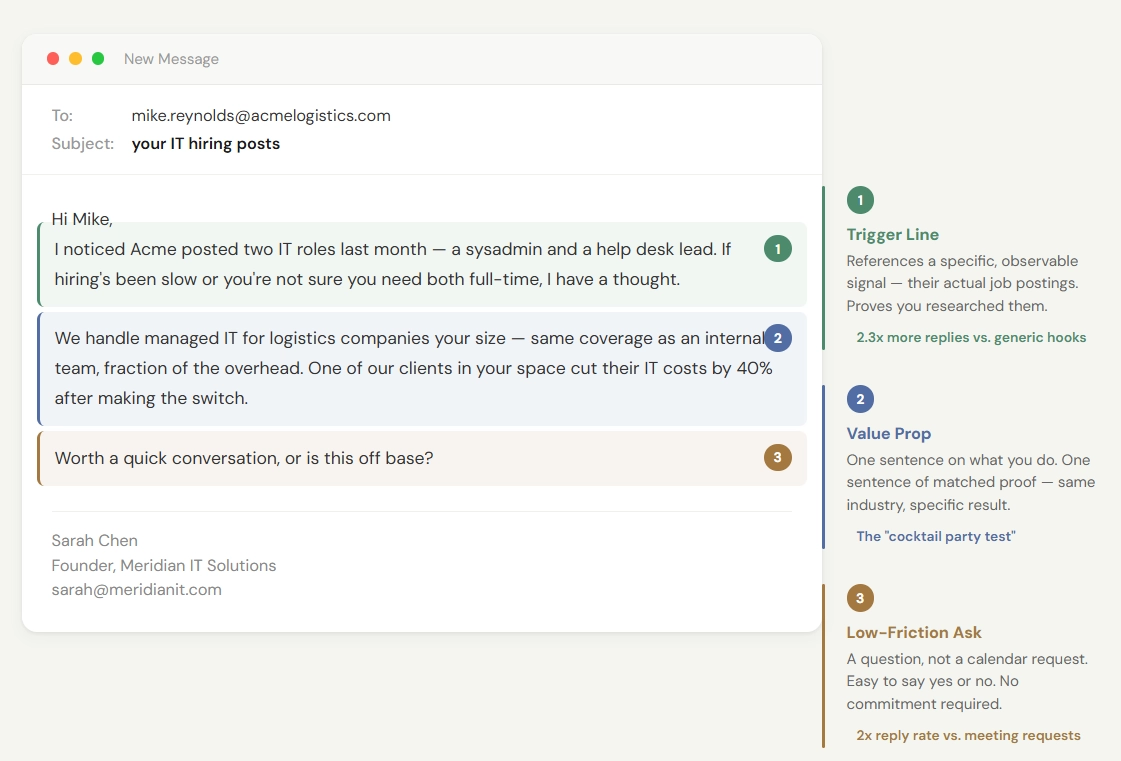
The #1 stat in this article: Trigger-based opening lines produce a 10% reply rate versus 4.4% for generic problem-based hooks. That's a 2.3x gap — and it translates to 3.4x more booked meetings. (Digital Bloom, 2025)
The recipient needs to understand, in the first two sentences, why you're emailing them specifically — not their industry, not their job title, them.
The way we do this is through trigger signals. These are observable events or facts about a prospect's company that indicate they might have the problem you solve.
"I noticed you posted two IT roles on LinkedIn last month — are you finding the right people, or is it turning into a headache?" — MSP emailing business owners
"Saw you have 8 open positions on your careers page. If you're getting volume but not quality, that's exactly what we help with." — Staffing agency emailing HR directors
"Congrats on the new role at [Company]. When marketing leaders step into an existing team, one of the first things they usually reevaluate is their agency roster — if that's on your list, I have a thought." — Consultancy emailing new VPs of Marketing
Each of these does two things: it proves you looked at their specific situation, and it connects to a real problem they're likely facing right now. That combination is what earns the read.
Finding these signals takes research — checking LinkedIn, the prospect's careers page, recent press, maybe their tech stack. It adds roughly 60–90 seconds per prospect. That's the trade-off: you email fewer people, but the people you email actually respond. And the gap is significant — custom first lines that reference something specific about the prospect drive 52% higher reply rates than simple merge tags like {{first_name}}. Layer in multiple personalization fields (company context, trigger event, industry detail) and replies can increase by as much as 142%.
2. A Clear Value Proposition in One Sentence
After the trigger, you need exactly one sentence that explains what you do and why it's relevant to them. Not a paragraph. Not a bulleted list of services. One sentence.
Bad:
"We provide end-to-end managed IT services including network monitoring, cybersecurity, cloud migration, help desk support, and strategic IT planning for growing businesses."
That's a services page, not an email.
Good:
"We handle IT for companies your size so you don't have to hire a full internal team — same coverage, fraction of the cost."
The reader needs to understand in three seconds what you do and how it connects to their trigger. If they can't, they'll stop reading. We call this the "cocktail party test" — if you wouldn't say it out loud to a stranger at a networking event, don't put it in an email.
When you do include proof, match it to the prospect. "We helped a similar-sized staffing agency add $180K in pipeline in 90 days" lands harder than "we helped a company increase revenue." Same industry, same size, specific numbers — that's what earns belief in one sentence.
3. A Low-Friction Ask
This is where most services firms blow it. They ask for a 30-minute call in the first email. From a stranger.
Think about it from the recipient's side. Someone you've never met is asking you to carve out half an hour from your Tuesday. That's a big commitment with no information about whether it'll be worth your time.
The data is unambiguous: interest-based CTAs outperform meeting requests by 2x on reply rate and produce significantly more positive responses. And keep it to one ask — emails with a single, clear CTA dramatically outperform emails with multiple options. Multiple asks split attention and reduce action.
Lower the bar. Give them something they can say yes to without putting anything on their calendar:
"Worth a conversation, or bad timing?"
"Is this on your radar at all, or am I off base?"
"Happy to share what we've seen work for similar companies — want me to send over a quick case study?"
"If this isn't relevant, no worries at all. But if it is — I'm around."
These work because they give the prospect an easy out ("no thanks" is a perfectly fine response — and it's still a response that tells you something) while keeping the door open for the ones who are interested.
Questions feel like conversations. Requests feel like obligations.
Real Email Angles That Work for Services Firms
We're not going to give you fill-in-the-blank templates — because templates are part of the problem. Business owners can spot a template from the first line. What we'll share instead are the angles that consistently produce replies, so you can write your own version. (These tie directly to the tight targeting over high volume approach we outlined in our cornerstone guide.)
| Angle | Best For | Signal to Look For |
|---|---|---|
| Hiring Signal | MSPs, staffing agencies | Job postings for roles your service replaces or supports |
| New Leader | Consultancies, agencies | New VP/Director/C-suite hire in a relevant department |
| Growth Signal | Any services firm | Funding round, new office, visible scaling indicators |
| Competitor Displacement | Firms with a clear differentiator | Prospect using a competitor's tool or approach with known limitations |
| Mutual Connection | Everyone (highest reply rate, lowest volume) | Shared contact, shared network, shared event |
The Hiring Signal Angle — You noticed they're hiring for roles related to what you do, which means they're feeling the pain your service solves. Lead with the observation, offer the alternative. Hiring signals are public, verifiable, and imply both budget and priority. (This is the #1 performing angle for MSPs — we break down the full MSP cold email playbook with specific targeting signals and realistic campaign timelines.) The same principle applies to K-12 — school districts post job openings, IT RFPs, and curriculum initiatives publicly, all of which are strong outbound signals for companies selling to schools.
The New Leader Angle — Someone just started a new leadership role. New leaders reevaluate vendors, processes, and strategy. You're reaching out at the exact moment they're most open to change.
The Growth Signal Angle — The company just raised funding, opened a new office, or is clearly scaling. Growth creates operational gaps — and your service fills one of them. Post-funding outreach is one of the strongest trigger categories because the company's priorities and budget just shifted simultaneously.
The Competitor Displacement Angle — You know or suspect they're using a competitor, and you have a specific reason why your approach is different. This is not "we're better than [competitor]." It's "most firms that use [approach] run into [specific problem] at your size — we take a different approach." Frame it around their likely experience, not your feature list.
The Mutual Connection Angle — Someone in your network knows them or works with them. Even a loose connection ("I was talking with [name] who works in your space") adds social proof that a cold email otherwise lacks.
Each angle has a built-in reason for reaching out that's specific to the prospect. That specificity is the whole game.
What We Test and What We've Learned
We A/B test nearly everything. Here's what we've learned, ordered by impact — because testing the wrong thing first is how firms waste months.
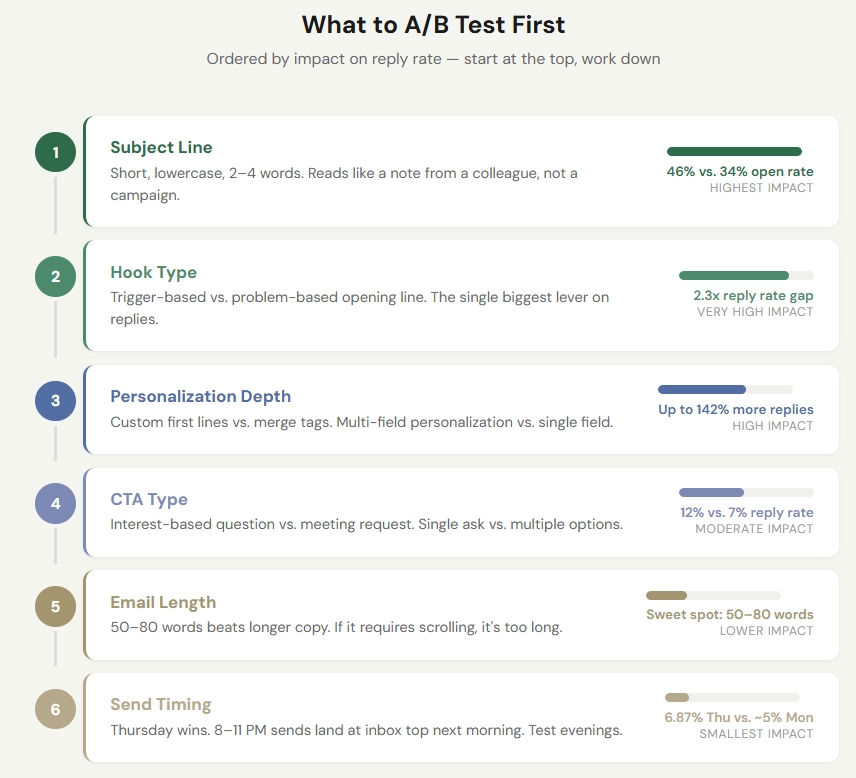
Testing priority (highest impact first): Subject line → Hook type → Personalization depth → CTA type → Email length → Send timing
Test subject lines first — they have the biggest swing. Two-to-four word subject lines in all lowercase get the highest open rates, around 46% in large-scale studies. Compare that to 10-word subject lines, which drop to 34%. Our best performers read like a casual message from a colleague: "quick question about IT" outperforms "Revolutionize Your IT Infrastructure Today" by a margin that's embarrassing for the second one. Personalized subject lines that include the company name add roughly 10% to open rates.
Then test your hook type. This is where the 2.3x reply rate gap between trigger-based and problem-based openers lives. If you're only going to test one thing beyond subject lines, test this.
Plain text beats designed emails. No logos, no HTML formatting, no images. Business owners don't get designed emails from people they know — they get plain text. The moment your email looks like marketing, it gets treated like marketing. And be careful with tracking pixels — the invisible images that tools use to detect opens. They add HTML to your message that spam filters can flag and savvy recipients notice, reducing reply rates by 10–15% in some studies. If you have to choose between tracking opens and maximizing replies, choose replies.
Three to four emails outperform long sequences. First follow-up boosts replies by 49%, and 55–60% of all replies come from follow-ups rather than the initial email. But response rates drop sharply after email four, and spam complaints nearly triple. For a 15-person MSP selling to business owners, three emails with genuine substance beats a seven-email drip sequence every time. We wrote about why this matters for services firms specifically — the short version is that your total addressable market is small enough that burning through it with an aggressive sequence is a real risk.
Space your follow-ups using the 3-7-7 cadence. Send the first follow-up three days after the initial email, the second seven days later, and the final email seven days after that. This captures roughly 93% of total replies by day 10.
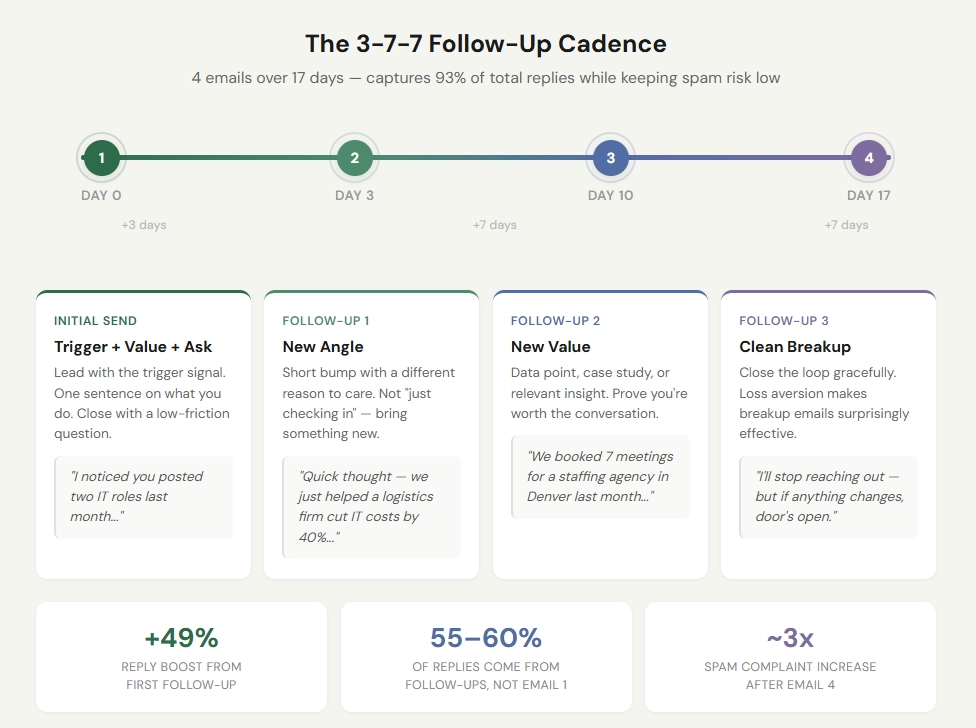
The 3-7-7 cadence:
Timing Purpose Initial send Day 0 Trigger + value prop + interest CTA Follow-up 1 Day +3 Simple bump with new angle Follow-up 2 Day +10 New value — data point, case study, insight Follow-up 3 Day +17 Breakup — clean close, leave door open
Send timing matters, but not the way most people think. Thursday is the strongest day (6.87% reply rate), followed by Wednesday and Tuesday. Monday sends compete with weekend catch-up. Here's the counterintuitive part: emails sent between 8–11 PM get the highest reply rates (6.52%) because they land at the top of the inbox the next morning. If you've been limiting yourself to 9 AM sends, test an evening window.
The follow-up that works best isn't a "bump." Don't say "bumping this to the top of your inbox." Bring a new angle or a new piece of value. A quick data point, a relevant case study, a one-line insight.
"Following up — we just helped a staffing agency in Denver book 7 meetings in their first month. Happy to share what we did differently."
That's a follow-up worth reading. And always make the final email a clean breakup — "I'll stop reaching out, but if anything changes, my door's open." Breakup emails consistently produce among the highest response rates in a sequence because loss aversion is a powerful thing.
The Mistake That Kills Everything Else
You can get the copy perfect and still fail if your emails don't reach the inbox. We've seen firms write strong emails, send them from their primary domain, and tank their sender reputation within weeks. Now their regular client emails land in spam too.
The fix is straightforward but non-negotiable: send from secondary domains with proper SPF, DKIM, and DMARC authentication. Warm those domains for at least two weeks before sending anything cold. Cap volume at 25–30 emails per mailbox per day. Monitor deliverability constantly.
This isn't the exciting part of cold email. It's the part that makes everything else possible.
How to Know If Your Emails Are Good
Here's the benchmark framework we use:
| Metric | Below Average | Good | Excellent | Notes |
|---|---|---|---|---|
| Open rate | <27% | >30% | >40% | Increasingly unreliable due to Apple Mail Privacy Protection |
| Reply rate | <4% | 5–10% | >10% | Primary KPI — this is what actually matters |
| Positive reply ratio | <30% | >40% | >50% | Percentage of total replies that are positive or interested |
| Bounce rate | >7% | <3% | <1% | High bounce = list quality problem |
A note on open rates: Apple's Mail Privacy Protection pre-loads tracking pixels, which inflates open rate numbers. Don't optimize obsessively around opens. Reply rate is the metric that matters.
If your numbers are below these benchmarks, the problem is almost always in the targeting or the first two sentences of the email — not in the CTA, not in the follow-up sequence, not in the subject line. Fix the "why you, why now" and the rest tends to follow.
Want to see how outbound works for your firm? Book a 30-minute call — no pitch deck, no pressure, just a conversation about your pipeline.